Pages

Wednesday, March 31, 2010

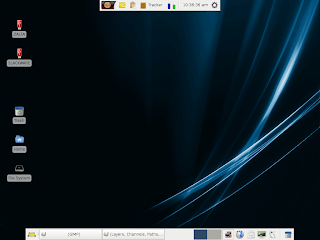
PC/OS 10.1.1 Release

PC/OS 10.1.1 Release

As a Good well known lightweight Distro,  PC/OS Linux is most popular  distro among it's competitors, There's an important announcement about PC/OS 10.1.1 Release, here's what i got from theis website.

PC/OS OpenWorkstation 10.1.1 PC/OS GNOME 10.1.1 as well as PC/OS WebStations 10.1.1. With this release we bring many bug fixes and enhancements to the platform. This release is a bug fix and precursor to the release of PC/OS 11. Some of the highlights of this release include.

  1. Linux Kernel 2.6.31 PAE, with the physical address extentions, users of 32 bit PC/OS can now utilize more RAM on 64 bit systems. 
  2. Gigilo is removed, replaced with pyneighborhood 
  3. Filezilla is now included
  4. Empathy has been upgraded to version 2.29.93
  5. Empathy has been removed from WebStation and replaced with Meebo
  6. Gnome Games has been removed from WebStation and replaced with Flashchess3
  7. An eBook reader has been added to PC/OS WebStation
  8. GNOME-ppp has been added to the GNOME release
  9. All security and bugfixes have been added to all releases
  10. We debut the new PC/OS themes, PC/OS Daylight, PC/OS Midnight and PC/OS Dusk

Known issues.

  1. With Jockey you have to manually initiate your NVIDIA driver install
  2. Upon booting the Live CD/DVD you have to enter a user name and password. The user name is "custom" leave the password blank and press enter.
  3. The Broadcom drivers install automatically, you will not have an option to "deactivate" them upon intial use you will have to manually enter your network name.


The Developer Kit and Office Kit from PC/OS 10.1 still function properly on this release.

With this release of OpenWorkstation we are testing our new delivery method of the ISO and md5 in an archive format, .zip as to be compatible with all OS's.

You can Download the Distro here:

Regards
Kang Tatang


Bookmark and Share

Thursday, February 11, 2010

live.linux-gamers.net : Linux Gaming Solution

live.linux-gamers.net ia a best place to download a Live DVD Linux Games. You may play a lot of good games without to have installing the games or the Operating system into your computer.

Linux-gamers.net have a lot of games to play, enough to make you enjoy your linux Box. with a wide variety to choose even for your old machine, it's all available. what makes it so good are :
  • top free native Linux games!
  • most of the games have a multiplayer mode!
  • high performance video card drivers
    • proprietary NVIDIA drivers for GeForce2 MX and better (up to GeForce GTX 295 included)
    • proprietary ATI driver for Radeon HD 2400 and better (up to Radeon HD 4890 included)
  • open source drivers with 3D acceleration for many other video cards
  • harddisk is not touched!
  • nothing needs to be configured, everything is done automatically
  • networking is configured using dhcp server (network manager included)
  • FREE!!!!
for a modern 3d games you must have a minimum :
  • i686-capable architecture
  • 512 MB ram
  • videocard with 3d acceleration
here are the games selection :
  • armagetronad
  • astromenace
  • blobby
  • chromium-bsu
  • extremetuxracer
  • foobillard
  • frozen-bubble
  • hedgewars
  • lbreakout2
  • pingus
  • quadra
  • smc
  • teeworlds
  • worldofgoo-demo
  • xmoto
  • fretsonfire
  • glest
  • maniadrive
  • neverball
  • neverputt
  • nexuiz
  • openlierox
  • sauerbraten
  • scorched3d
  • supertuxkart
  • torcs
  • tremulous
  • urbanterror
  • warsow
  • warzone
  • wesnoth
  • widelands
  • worldofpadman.
so who said games are only for windows? better think again before talk like that because Playing games on Linux now is more fun.

regards
Kangtatang

Bookmark and Share

Sunday, January 31, 2010

Playdeb.net - Source for Ubuntu's and Linux Games

How are you friend? I hope everything is fine.

I haven't write any post for a long time due to my busy activities. hopefully from now on I can write a blog as usual.

This time I will provide information to Ubuntu's users who wants to play a good games for linux on his computer. The Ubuntu's senior user may already be familiar with this site.

On this site we can download a variety of games from various genres for free. This site address is Playdeb.net, on this site we can see a lot of games by looking at catalogs or directly type the name of the game we want to download.


Do not be surprised if you find a lot of good games and not less than that of commercial games released for OS windows. starting from 2D games to 3D games with the genre of action, RPG, FPS, racing and others.


if you've just installed Ubuntu 9:10 Karmic Koala, you can simply direct your web browser to this site.

Regards
Kang Tatang on Om Linux


Print This Page


Bookmark and Share

Wednesday, November 4, 2009

Privacy Policy

Privacy Policy for www.most-popular-linux-distribution.blogspot.com 


If you require any more information or have any questions about our privacy policy, please feel free to contact us by email at goowing13@gmail.com. 

At www.most-popular-linux-distribution.blogspot.com, the privacy of our visitors is of extreme importance to us. This privacy policy document outlines the types of personal information is received and collected by www.most-popular-linux-distribution.blogspot.com and how it is used. 

Log Files
Like many other Web sites, www.most-popular-linux-distribution.blogspot.com makes use of log files. The information inside the log files includes internet protocol ( IP ) addresses, type of browser, Internet Service Provider ( ISP ), date/time stamp, referring/exit pages, and number of clicks to analyze trends, administer the site, track user’s movement around the site, and gather demographic information. IP addresses, and other such information are not linked to any information that is personally identifiable. 

Cookies and Web Beacons 
www.most-popular-linux-distribution.blogspot.com does use cookies to store information about visitors preferences, record user-specific information on which pages the user access or visit, customize Web page content based on visitors browser type or other information that the visitor sends via their browser. 

DoubleClick DART Cookie 
.:: Google, as a third party vendor, uses cookies to serve ads on www.most-popular-linux-distribution.blogspot.com.
.:: Google's use of the DART cookie enables it to serve ads to users based on their visit to www.most-popular-linux-distribution.blogspot.com and other sites on the Internet. 
.:: Users may opt out of the use of the DART cookie by visiting the Google ad and content network privacy policy at the following URL - http://www.google.com/privacy_ads.html 

Some of our advertising partners may use cookies and web beacons on our site. Our advertising partners include ....
Google Adsense


These third-party ad servers or ad networks use technology to the advertisements and links that appear on www.most-popular-linux-distribution.blogspot.com send directly to your browsers. They automatically receive your IP address when this occurs. Other technologies ( such as cookies, JavaScript, or Web Beacons ) may also be used by the third-party ad networks to measure the effectiveness of their advertisements and / or to personalize the advertising content that you see. 

www.most-popular-linux-distribution.blogspot.com has no access to or control over these cookies that are used by third-party advertisers. 

You should consult the respective privacy policies of these third-party ad servers for more detailed information on their practices as well as for instructions about how to opt-out of certain practices. www.most-popular-linux-distribution.blogspot.com's privacy policy does not apply to, and we cannot control the activities of, such other advertisers or web sites. 

If you wish to disable cookies, you may do so through your individual browser options. More detailed information about cookie management with specific web browsers can be found at the browsers' respective websites. 

Tuesday, October 6, 2009

Top Ten Most Popular Linux Distribution

Hello my friend, how are you? may god bless us all.
today I want to share an information with you, I found an interesting video on youtube, I guest you'll like it, chek it out.

Regards


Tuesday, May 12, 2009

SABILY 9.04 - UBUNTU MUSLIM EDITION

The Sabily team is proud to announce the release of latest Ubuntu Muslim Edition now known as Sabily 9.04, codename "Taibah". Sabily 9.04 is available as a Live DVD (so you can test it without installing anything on your computer), with 3 versions:
  • Small version (935 MB): contains the main Sabily packages (artwork, islamic applications) and Arabic support
  • Full version (1.4 GB): same as above plus multimedia, education and miscellaneous packages (see the full list here: http://tinyurl.com/dfwvgk)
  • Full version with recitations (2.8 GB): same as above plus Quran recitations provided by www.versebyversequran.com: Muhammad Siddeeq al-Minshawi, Huzify, Sa’ad al-Ghamadi and Mishary Rashed Alafasy. Note: this version is useful if you are not connected to the Internet (all Sabily versions provide online recitations)
A CD (184 MB) containing the Sabily packages is also available if you want to convert a standard Ubuntu 9.04 (Jaunty Jackalope) installation to Sabily.

What's new in this release:
  1. "hijra" application: Hijri Islamic Calendar tray applet
  2. mus-haf Othman application : Othman Quran Browser which displays Quranic text in Othmani script style
  3. What's changed:
  4. new distro name ("Sabily") and all artwork updated to use this name (new usplash, gdm theme, gdm login screen)
  5. Thwab can now open Shamela books
Main features:
  1. Parental control tool installed (WebStrict)
  2. Zekr 0.7.2 (Quran study tool), able to play Quran recitations
  3. Prayer times apps: Minbar and Firefox 'Pray Times' add-on
  4. Thwab (encyclopaedia)
  5. Custom artwork: usplash, login screen, Islamic wallpapers and theme.
  6. Full support for Arabic language.
  7. The full version of the DVD contains multimedia, educational and many other useful software
Download Sabily 9.04 here.


Bookmark and Share

Tuesday, April 28, 2009

Parted Magic - Linux Partition Manager

Parted Magic-Linux Partition Manager

Parted Magiclinux partition type has a different file system with Windows Operating System. if the Windows OS using the FAT, FAT32 and NTFS then Linux OS use raiser, ext2, ext3 etc.

Parted MagicIf you intend to install Linux on your computer and intend to prepare the partition for installation, then you can use the Parted Magic distributions, ie a Linux OS Distro specifically created as Partition Manager. and this Great distro running as Live CD, you only need to enter a CD into the optical drive and then BOOT CD and you can use this Operating System to make any kind of partition in your hard drive.

Parted Magic distributions available for free, the ability to create a partition can be very reliable.


Bookmark and Share

Monday, April 27, 2009

LINUX BASIC COMMAND

A summary of useful Linux commands

A summary of useful Linux commands
Starting & Stopping

shutdown -h now Shutdown the system now and do not reboot
halt Stop all processes - same as above
shutdown -r 5 Shutdown the system in 5 minutes and reboot
shutdown -r now Shutdown the system now and reboot
reboot Stop all processes and then reboot - same as above
startx Start the X system

Accessing & mounting file systems

mount -t iso9660 /dev/cdrom/mnt/cdrom Mount the device cdrom and call it cdrom under the /mnt directory 
mount -t msdos /dev/hdd/mnt/ddrive Mount hard disk “d” as a msdos file system and call it ddrive under the /mnt directory
mount -t vfat /dev/hda1/mnt/cdrive Mount hard disk “a” as a VFAT file system and call it drive under the /mnt directory
umount /mnt/cdrom Unmount the cdrom 

Finding files and text within files

find / -name fname Starting with the root directory, look for the file called fname
find / -name ”*fname*” Starting with the root directory, look for the file containing the string fname
locate missingfilename Find a file called missingfilename
using the locate command - this
assumes you have already used the command updatedb (see next)
updatedb Create or update the database of files on all file systems attached to the linux root directory which missingfilename Show the subdirectory containing the executable file called missingfilename
grep textstringtofind/dir Starting with the directory called dir, look for and list all files containing textstringtofind 

The X Window System

xvidtune Run the X graphics tuning utility
XF86Setup Run the X configuration menu with automatic probing of graphics cards
Xconfigurator Run another X configuration menu with automatic probing of graphics cards
xf86config Run a text based X configuration menu 

Moving, copying, deleting & viewing files

ls -l List files in current directory using long format
ls -F List files in current directory and indicate the file type
ls -laC List all files in current directory in long format and display in columns
rm name Remove a file or directory called name
rm -rf name Kill off an entire directory and all it’s includes files and subdirectories
cp filename/home/dirname Copy the file called filename to the /home/dirname directory 
mv filename/home/dirname Move the file called filename to the /home/dirname directory
cat filetoview Display the file called filetoview 
man -k keyword Display man pages containing keyword 
more filetoview Display the file called filetoview one page at a time, proceed to next page using the spacebar head filetoview Display the first 10 lines of the file called filetoview
head -20 filetoview Display the first 20 lines of the file called filetoview
tail filetoview Display the last 10 lines of the file called filetoview
tail -20 filetoview Display the last 20 lines of the file called filetoview

Installing software for Linux

rpm -ihv name.rpm Install the rpm package called name rpm -Uhv name.
rpm Upgrade the rpm package called name
rpm -e package Delete the rpm package called package
rpm -l package List the files in the package called package
rpm -ql package List the files and state the installed version of the package called package
rpm -i --force package Reinstall the rpm package called name having deleted parts of it (not deleting using rpm -e)
tar -zxvf archive.tar.gz or tar -zxvf archive.tgz  Decompress the files contained in  the zipped and tarred archive called  archive
./configure Execute the script preparing the installed files for compiling  

User Administration

adduser accountname Create a new user call accountname
passwd accountname Give accountname a new password
su Log in as superuser from current login
exit Stop being superuser and revert to normal user
Little known tips and tricks
ifconfig List ip addresses for all devices on the machine
apropos subject List manual pages for subject
usermount Executes graphical application for mounting and unmounting file
systems
/sbin/e2fsck hda5 Execute the filesystem check utility on partition hda5
fdformat /dev/fd0H1440 Format the floppy disk in device fd0
tar -cMf /dev/fd0 Backup the contents of the current directory and subdirectories to multiple floppy disks
tail -f /var/log/messages Display the last 10 lines of the system log.
cat /var/log/dmesg Display the file containing the boot time messages - useful for locating problems. Alternatively, use the dmesg command.
* wildcard - represents everything. eg. cp from/* to will copy all files in the from directory to the to directory
? Single character wildcard. eg. cp config.? /configs will copy all files beginning with the name config. In the current directory to the directory named configs.
[xyz] Choice of character wildcards. eg. ls [xyz]* will list all files in the current directory starting with the letter x, y, or z.
linux single At the lilo prompt, start in single user mode. This is useful if you have forgotten your password. Boot in single user mode, then run the passwd command.
ps List current processes
kill 123 Kill a specific process eg. kill 123

Configuration files and what they do

/etc/profile System wide environment variables for all users.
/etc/fstab List of devices and their associated mount points. Edit this file to add cdroms, DOS partitions and floppy drives at startup.
/etc/motd Message of the day broadcast to all users at login.
etc/rc.d/rc.local Bash script that is executed at the end of login process. Similar to autoexec.bat in DOS.
/etc/HOSTNAME Conatins full hostname including domain.
/etc/cron.* There are 4 directories that automatically execute all scripts within the directory at intervals of hour, day, week or month.
/etc/hosts A list of all know host names and IP addresses on the machine.
/etc/httpd/conf Paramters for the Apache web server
/etc/inittab Specifies the run level that the machine should boot into.
/etc/resolv.conf Defines IP addresses of DNS servers.
/etc/smb.conf Config file for the SAMBA server. Allows file and print sharing with Microsoft clients.
/etc/X11/XF86Config Config file for X-Windows.
~/.xinitrc Defines the windows manager loaded by
X. ~ refers to user’s home directory.

File permissions

If the command ls -l is given, a long list of file names is displayed. The first column in this list details the permissions applying to the file. If a permission is missing for a owner,
group of other, it is represented by - eg. drwxr-x—x 
Read = 4
Write = 2
Execute = 1
File permissions are altered by giving the chmod command and the appropriate
octal code for each user type. Eg chmod 7 6 4 filename will make the file called filename R+W+X for the owner, R+W for the group and R for others. chmod 7 5 5 Full permission for the owner, read and execute access for the group and others. chmod +x filename Make the file called filename executable to all users.
X Shortcuts - (mainly for Redhat) 
Control|Alt + or - Increase or decrease the screen resolution. eg. from 640x480 to 800x600
Alt | escape Display list of active windows
Shift|Control F8 Resize the selected window 
Right click on desktop background Display menu
Shift|Control Altr Refresh the screen
Shift|Control Altx Start an xterm session 

Printing

/etc/rc.d/init.d/lpd start Start the print daemon
/etc/rc.d/init.d/lpd stop Stop the print daemon
/etc/rc.d/init.d/lpd status Display status of the print daemon
lpq Display jobs in print queue
lprm Remove jobs from queue
lpr Print a file
lpc Printer control tool
man subject | lpr Print the manual page called subject as plain text
man -t subject | lpr Print the manual page called subject as Postscript output
printtool Start X printer setup interface
~/.Xdefaults Define configuration for some Xapplications.
~ refers to user’s home


Bookmark and Share

Ubuntu Basic Command Reference

Ubuntu Basic Command Reference

Ubuntu Basic Command Reference
Privileges
sudo command – run command as root
sudo -s – open a root shell
sudo -s -u user – open a shell as user
sudo -k – forget sudo passwords
gksudo command – visual sudo dialog (GNOME)
kdesudo command – visual sudo dialog (KDE)
sudo visudo – edit /etc/sudoers
gksudo nautilus – root file manager (GNOME)
kdesudo konqueror – root file manager (KDE)
passwd – change your password

Display
sudo /etc/init.d/gdm restart – restart X and return to login (GNOME)
sudo /etc/init.d/kdm restart – restart X and return to login (KDE)
(file) /etc/X11/xorg.conf – display configuration
sudo dexconf – reset xorg.conf configuration
Ctrl+Alt+Bksp – restart X display if frozen
Ctrl+Alt+FN – switch to tty N
Ctrl+Alt+F7 – switch back to X display

System Services
start service – start job service (Upstart)
stop service – stop job service (Upstart)
status service – check if service is running (Upstart)
/etc/init.d/service start – start service (SysV)
/etc/init.d/service stop – stop service (SysV)
/etc/init.d/service status – check service (SysV)
/etc/init.d/service restart – restart service (SysV)
runlevel – get current runlevel

Package Management
apt-get update – refresh available updates
apt-get upgrade – upgrade all packages
apt-get dist-upgrade – upgrade with package replacements; upgrade Ubuntu version
apt-get install pkg – install pkg
apt-get purge pkg – uninstall pkg
apt-get autoremove – remove obsolete packages
apt-get -f install – try to fix broken packages
dpkg --configure -a – try to fix broken packages
dpkg -i pkg.deb – install file pkg.deb 
(file) /etc/apt/sources.list – APT repository list

Network
ifconfig – show network information
iwconfig – show wireless information
sudo iwlist scan – scan for wireless networks
sudo /etc/init.d/networking restart – reset network for manual configurations
(file) /etc/network/interfaces – manual configuration
ifup interface – bring interface online
ifdown interface – disable interface

Special Packages
ubuntu-desktop – standard Ubuntu environment
kubuntu-desktop – KDE desktop
xubuntu-desktop – XFCE desktop
ubuntu-minimal – core Ubuntu utilities
ubuntu-standard – standard Ubuntu utilities
ubuntu-restricted-extras – non-free, but useful
kubuntu-restricted-extras – KDE of the above
xubuntu-restricted-extras – XFCE of the above
build-essential – packages used to compile programs
linux-image-generic – latest generic kernel image
linux-headers-generic – latest build headers

Firewall
ufw enable – turn on the firewall
ufw disable – turn off the firewall
ufw default allow – allow all connections by default
ufw default deny – drop all connections by default
ufw status – current status and rules
ufw allow port – allow traffic on port
ufw deny port – block port
ufw deny from ip – block ip adress

Application Names
nautilus – file manager (GNOME)
dolphin – file manager (KDE)
konqueror – web browser (KDE)
kate – text editor (KDE)
gedit – text editor (GNOME)

System
Recovery - Type the phrase “REISUB” while holding down Alt and SysRq (PrintScrn) with about 1 second between each letter. Your system will reboot.
lsb_release -a – get Ubuntu version
uname -r – get kernel version
uname -a – get all kernel information


Ubuntu is a trademark of Canonical Ltd. Licensed under CC-BY-SA 3.0. 
Free to redistribute; see creativecommons.org for details.


Bookmark and Share

Thursday, April 23, 2009

What Is PC/OS Desktop Linux Distribution

PC/OS Desktop 

PC/OS Desktop
Dear reader, are you looking for a lightweight Linux Ditribution to use on you (Old) computer? There are so many Lightweight Linux distributions out there. One of them which are my favourite is PC/OS, this Distro derivative from Ubuntu Linux Distro.

Almost all of standar big Distribution did not include Multimedia codec on their Package, tis issue make user that has a little problem with installing/finding multimedia codec feel a little disappointed about it. 

It will not be happened if we use a Linux Distribution that has multimedia codec included, like PC/OS.

PC/OS Desktop
PC/OS can play Multimedia file such as MP3’s File and DVD Movie’s File, and also has Flash Player and Sun Java 6 JRE included.

We can find almost all Ubuntu’s standard applications in this Distribution, like Abiword 2.4.6, Gnumeric 1.8.2, Flock 1.2.4 dan Audacious 1.5.0.

In Spite of using Xfce Windows Manager, PC/OS still have abeautifull Look, realy reliable, fast and Lightweight. This Operating System is really suitable for Old computers who need modern features with its simplicity and light in weight.

The Multimedia Features are really rockin :) the good news is PC/OS allready include Wine Application, an application to run Windows OS Application on Linux OS, So if you stilll get your hand on Wndows Apps, you can bring it On PC/OS (Not All Application can be run)

You can get more information and download the Distro on their website @ http://www.pc-os.org
  • Creator: PC/OS
  • Kernel: 2.6.24-19
  • Office: Abiword 2.4.6, Gnumeric 1.8.2
  • Desktop: Xfce 4.4.2
  • Graphics: GIMPS 2.4.5, Ristretto 0.0.18
  • Multimedia: Audacious 1.5.0, GTKpod 0.99.12, Mplayer 1.0
  • Internet: Flock 1.2.4, Thunderbird 2.0, Transmission 1.06

Minimum Specification:


Bookmark and Share

LinkWithin

Related Posts Plugin for WordPress, Blogger...

Breaking News

Followers