Pages

Showing posts with label Linux Distro. Show all posts

Thursday, April 23, 2009

What Is PC/OS Desktop Linux Distribution

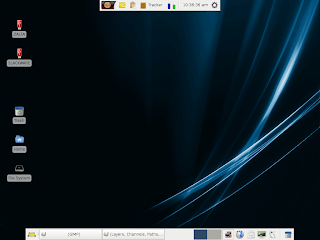
PC/OS Desktop 

PC/OS Desktop
Dear reader, are you looking for a lightweight Linux Ditribution to use on you (Old) computer? There are so many Lightweight Linux distributions out there. One of them which are my favourite is PC/OS, this Distro derivative from Ubuntu Linux Distro.

Almost all of standar big Distribution did not include Multimedia codec on their Package, tis issue make user that has a little problem with installing/finding multimedia codec feel a little disappointed about it. 

It will not be happened if we use a Linux Distribution that has multimedia codec included, like PC/OS.

PC/OS Desktop
PC/OS can play Multimedia file such as MP3’s File and DVD Movie’s File, and also has Flash Player and Sun Java 6 JRE included.

We can find almost all Ubuntu’s standard applications in this Distribution, like Abiword 2.4.6, Gnumeric 1.8.2, Flock 1.2.4 dan Audacious 1.5.0.

In Spite of using Xfce Windows Manager, PC/OS still have abeautifull Look, realy reliable, fast and Lightweight. This Operating System is really suitable for Old computers who need modern features with its simplicity and light in weight.

The Multimedia Features are really rockin :) the good news is PC/OS allready include Wine Application, an application to run Windows OS Application on Linux OS, So if you stilll get your hand on Wndows Apps, you can bring it On PC/OS (Not All Application can be run)

You can get more information and download the Distro on their website @ http://www.pc-os.org
  • Creator: PC/OS
  • Kernel: 2.6.24-19
  • Office: Abiword 2.4.6, Gnumeric 1.8.2
  • Desktop: Xfce 4.4.2
  • Graphics: GIMPS 2.4.5, Ristretto 0.0.18
  • Multimedia: Audacious 1.5.0, GTKpod 0.99.12, Mplayer 1.0
  • Internet: Flock 1.2.4, Thunderbird 2.0, Transmission 1.06

Minimum Specification:


Bookmark and Share

Monday, April 13, 2009

Linux spam filter-the protection

Linux spam filter-the protection 

Linux spam filter-the protection
Do You feel angry when virus and spam attacks your email/email server? nothing make people feel chapfallen other than to receive spam and viruses. If you are an currently an email administrator, then this can be the beginning of a bad career for you if you let it. 

Spam and virus attacks that can lead to ongoing performance and decreased even hang. Spam is one of the main causes of utmost network resource consumption, resource CPU, hard drive space, and others. 

One practical solution to avoid problems is to upgrade the hardware or use a separate e-mail servers, spam filters and virus filters on a different machine. 

One of the linux distro that can be used as reference to build a Linux server with Spam filter, such as technical scheme above is Ubuntu Linux distributions. This is because the Ubuntu Linux distributions LTS Server edition has a package Mail Transfer Agent (MTA) with Dovecot application as POP 3. While to filter spam and virus filters can use Untangle Gateway Applications. 

Required two computers, which is installed on the computer first mail server with the Ubuntu LTS server edition (or can use another Linux distro), and on the second computer is installed Untangle Application. 

Linux spam filter-the protection
Each computer has two network cards, one port with the settings given the public IP Address and another port given IP Local Address and connect between computers in parallel scheme, Technicaly, port 1 on a computer as the entrance of the Internet, and Port 2 connect to Port 3 on the computer B and Port 4 distribute results filter through to the destination on LAN Network. 

So with Applications Spam Blocker that act as filters for spam and virus filters as Virus Blocker with Untangel Applications Reports for the reporting system is said to be enough as a spam filter system using the Linux OS.


LinkWithin

Related Posts Plugin for WordPress, Blogger...

Breaking News

Followers